


How to Use Pause Mode on IQOS ILUMA i: Step-by-Step Guide for UAE Users

How to Use Pause Mode on IQOS ILUMA i: Step-by-Step Guide for UAE Users
Have you ever needed to stop your IQOS ILUMA i session because of an unexpected interruption? The Pause Mode feature is designed for exactly this situation. It allows compatible IQOS ILUMA i devices to temporarily pause an active session and resume it within a limited time.
Whether you are learning about the device for the first time or trying to understand why Pause Mode is not working, this guide explains how the feature works, how to activate it, which models support it, and what limitations you should know.
In this guide, you will learn:
- What Pause Mode does
- Which IQOS ILUMA i models support it
- How to activate and resume a paused session
- How long a session can remain paused
- Why Pause Mode might not work
- Common mistakes and troubleshooting steps
What Is Pause Mode on IQOS ILUMA i?
Pause Mode is a feature that temporarily stops an active experience on compatible IQOS ILUMA i devices. You can then resume the same experience within the permitted pause period.
It is intended for short interruptions rather than extended breaks.
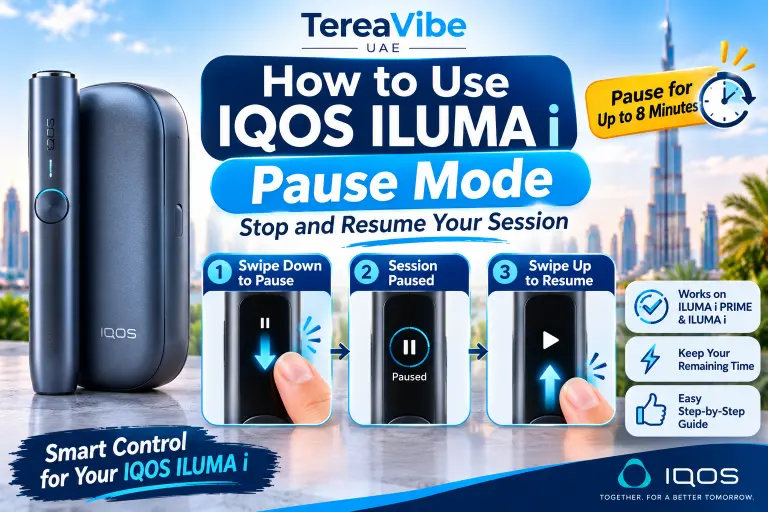
According to the manufacturer’s information, Pause Mode can last for up to 8 minutes. If the experience is not resumed within that period, the Holder automatically switches off and the session ends.
Which IQOS Devices Support Pause Mode?
Pause Mode is available on:
- IQOS ILUMA i PRIME
- IQOS ILUMA i (Standard)
It is not available on the IQOS ILUMA i ONE or older IQOS ILUMA models.
Your device must also have Pause Mode enabled and meet the feature’s operating conditions.
How Does Pause Mode Work?
Pause Mode temporarily interrupts the active experience and gives you a limited opportunity to resume it.
There are several conditions to understand before using it:
- It is available in Performance Mode.
- It can be activated during the first 3 minutes or first 8 puffs of an experience.
- It is available for one of the first two consecutive experiences in Performance Mode.
- The maximum pause period is 8 minutes.
- When Pause Mode is used, the experience is limited to 14 puffs in total, including puffs taken before and after the pause.
These conditions are important because Pause Mode may not appear as available during every session.
How to Activate Pause Mode on IQOS ILUMA i
The process is slightly different from pressing a regular control button. The ILUMA i uses its Holder Touch Screen to activate the feature.
Step 1: Start an Experience
Make sure your IQOS ILUMA i is switched on and ready. Insert a compatible TEREA stick and start the experience according to the device instructions.
Wait until the device indicates that it is ready.
Step 2: Check Pause Mode Availability
Look at the Holder Touch Screen.
When Pause Mode is available, two short vertical lines appear at the top of the screen. If these indicators are missing, the feature may not currently be available or enabled.
Step 3: Swipe Down to Pause
Swipe down across the entire Touch Screen on the Holder.
A vibration confirms that Pause Mode has started. The screen indicators will change to show that the experience is paused.
Make sure your swipe covers the full length of the screen. A partial movement may not activate the feature.
Step 4: Resume the Experience
When you are ready to continue, swipe up across the entire Touch Screen.
The device will begin preheating again. This process takes approximately 20 seconds on average.
Wait for the vibration and light indication confirming that the Holder is ready before continuing.
Step 5: Resume Within 8 Minutes
Remember that the pause period is limited to 8 minutes. If you do not resume within that time, the Holder automatically switches off and the experience ends.
How Long Can You Pause an IQOS ILUMA i Session?
The maximum Pause Mode duration is 8 minutes.
The Touch Screen LEDs gradually fade out during the pause to indicate the countdown. The Holder also provides vibration feedback when the pause is approaching its end.
If you do not resume within the permitted period, the session will end automatically.
It is important to understand that Pause Mode does not restart the experience from the beginning. The original experience remains subject to its total puff limit.
Pause Mode vs. Ending an Experience
These two actions are not the same.
| Feature | Pause Mode | Ending an Experience |
|---|---|---|
| Purpose | Temporarily interrupts an active experience | Stops the experience |
| Resume option | Available within the permitted period | The same experience cannot be resumed |
| Time limit | Up to 8 minutes | No pause countdown |
| Activation | Swipe down on the Touch Screen | Follow the device’s session-ending instructions |
| Best understood as | A temporary interruption | A completed or stopped experience |
Pause Mode is intended for short interruptions. It should not be treated as a way to store an unfinished experience for later.
Why Is Pause Mode Not Working?
If Pause Mode does not activate, check the following possible causes.
1. Pause Mode Is Not Enabled
Open the IQOS app or web app and check whether Performance Mode and Pause Mode are enabled, where supported.
Look for the two short vertical lines at the top of the Touch Screen. Their absence may indicate that the feature is not activated.
2. Eco Mode Is Active
Pause Mode is available in Performance Mode, not Eco Mode.
If your device is configured for Eco Mode, check the FlexBattery setting and switch to Performance Mode using the supported app or device settings.
3. You Are Trying to Pause Too Late
Pause Mode is only available during the first 3 minutes or first 8 puffs of an experience.
If you try to activate it after this window, the feature may no longer be available.
4. The Swipe Movement Is Incorrect
A short or incomplete swipe may not be recognised.
Swipe down across the entire length of the Holder Touch Screen. To resume, swipe up across the entire screen.
5. Pause Mode Has Already Been Used
Pause Mode is available for only one of the first two consecutive experiences in Performance Mode.
If it has already been used within that sequence, it may not be available again.
6. Device or Battery Problems
If the feature still does not work after checking the settings and swipe movement, the device may require further troubleshooting.
Check the battery status and consult official IQOS support if the issue continues.
Important Pause Mode Limitations
Before using the feature, keep these points in mind:
- Pause Mode is limited to compatible IQOS ILUMA i models.
- It is not available on IQOS ILUMA i ONE.
- It requires Performance Mode.
- It must be activated within the first 3 minutes or 8 puffs.
- It is available for one of the first two consecutive experiences.
- The maximum pause period is 8 minutes.
- The experience is limited to 14 puffs when Pause Mode is used.
- FlexPuff does not activate for an experience in which Pause Mode is used.
Always check the instructions for your specific device and software configuration.
Frequently Asked Questions
Does IQOS ILUMA i ONE have Pause Mode?
No. Pause Mode is available on IQOS ILUMA i PRIME and IQOS ILUMA i Standard, not ILUMA i ONE.
How many minutes can I pause an experience?
You can pause an experience for up to 8 minutes. If you do not resume within this period, the Holder automatically switches off.
How do I activate Pause Mode?
Swipe down across the entire Holder Touch Screen. A vibration confirms that Pause Mode has started.
How do I resume a paused experience?
Swipe up across the entire Holder Touch Screen. Wait for the device to complete its approximately 20-second preheating process and indicate that it is ready.
Why are two vertical lines not showing on my screen?
Pause Mode may not be enabled, your device may not meet the required operating conditions, or the feature may not be available for the current experience. Check the settings and device compatibility.
Can I use Pause Mode more than once?
Pause Mode is available for one of the first two consecutive experiences in Performance Mode. It is not designed for unlimited or repeated pauses.
Does Pause Mode work in Eco Mode?
No. Pause Mode is available in Performance Mode. Check your FlexBattery settings if Eco Mode is active.
Does Pause Mode affect FlexPuff?
Yes. FlexPuff does not activate during an experience in which Pause Mode is used.
Final Thoughts
Pause Mode is a specific feature of the IQOS ILUMA i PRIME and IQOS ILUMA i Standard. Understanding the correct swipe gestures, operating conditions, and 8-minute limit can help you recognise when the feature is available and why it may not activate.
If you are experiencing problems, first check the device model, Performance Mode settings, Touch Screen indicators, and timing conditions. For persistent issues, consult official IQOS support.
Important health information: IQOS and TEREA are tobacco-related products. TEREA contains tobacco and nicotine, and nicotine is addictive. Heated tobacco products are not risk-free. This article is for informational purposes and is intended for adults of legal purchasing age.